Redirect DC EMI Integration
1. Introduction
DEBIT CARD EMI :- Debit card EMI is a payment option that allows customers to pay for their purchases periodically. Instead of paying the full amount upfront, they can divide the total costs into small amounts. It is an option to convert payments made through debit cards into monthly instalments. Pinelabs helps the merchant to offer no-cost, low-cost EMI on their products by bringing issuing bank and OEMs on the same platform.
2. Overview
EMI offers configuration can be requested to the Pinelabs team as per the requirements. EMI Offers configured by pinelabs operation team through PGUI for given bank and brand.
3. Implementation Details
Follow these steps to offer bank and brand EMI offers to your customers
Accept Payment:
It initiates the transaction. Merchant must pass unique merchant txn reference number, amount, and other parameters.
URL:
Request Headers:
HEADERS:
| Header name | Header value |
|---|---|
| Content-Type | application/json |
| X-VERIFY | SHA256of (Base64 request encoded payload) |
Body Param
| Parameter Name | Type | Description | Mandatory(M)/Optional |
|---|---|---|---|
| merchant_data | Object | It contains information about merchant. | M |
| payment_data | Object | It contains information about payment data. | M |
| txn_data | Object | It contains transaction related data | M |
| customer_data | Object | It contains information about customer data.Merchants who are on aggregator model must pass this data | O |
| udf_data | Object | It contains user defined fields. Merchant can pass it transaction specific data in these fields | O |
merchant_data
| Parameter Name | Type | Description | Mandatory(M)/Optional/Conditional |
|---|---|---|---|
| merchant_id | int | Merchant id provided by pinelabs | M |
| merchant_access_code | string | Merchant access code provided by pine labs | M |
| unique_merchant_txn_id | string | Unique transaction id maintained by merchant for each transaction | M |
| merchant_return_url | string | Merchant return url on which browser response will be sent.Mandatory in the case of EMI | M |
payment_data
| Parameter Name | Type | Description | Mandatory(M)/Optional/Conditional |
|---|---|---|---|
| amount_in_paisa | long | Transaction amount in paise | M |
txn_data
| Parameter Name | Type | Description | Mandatory(M)/Optional/Conditional |
|---|---|---|---|
| navigation_mode | Int | Navigation mode 2 for Redirect7 for Seamless | M |
| payment_mode | String | It will contain csv of valid payment mode Ids.In case of seamless mode only single payment mode to be specified. | M |
| transaction_type | Int | 1 for ‘Purchase’ | M |
| time_stamp | Long | Unix timestamp | O |
customer_data
| Parameter Name | Type | Description | Mandatory(M)/Optional/Conditional |
|---|---|---|---|
| email_id | string | Customer email id | O |
| first_name | string | Customer first name | O |
| last_name | string | Customer last name | O |
| customer_id | string | Customer id maintained at merchant end | O |
| mobile_no | string | 10 digit mobile number | O |
| billing_data | Object | Customer billing address details | O |
| shipping_data | Object | Customer Shipping address details | O |
udf_data
| Parameter Name | Type | Description | Mandatory(M)/Optional/Conditional |
|---|---|---|---|
| udf_field_1 | string | User defined Fields | O |
| udf_field_2 | string | User defined Fields | O |
| udf_field_3 | string | User defined Fields | O |
| udf_field_4 | string | User defined Fields | O |
| udf_field_5 | string | User defined Fields | O |
billing_data
| Parameter Name | Type | Description | Mandatory(M)/Optional/Conditional |
|---|---|---|---|
| address1 | string | Address 1 | O |
| address2 | string | Address 2 | O |
| address3 | string | Address 3 | O |
| pincode | string | Pin code | O |
| city | string | City name | O |
| state | string | State name | O |
| country | string | Country name | O |
shipping_data
| Parameter Name | Type | Description | Mandatory(M)/Optional/Conditional |
|---|---|---|---|
| first_name | String | First name entered in shipping address | O |
| last_name | String | Last name entered in shipping address | O |
| mobile_no | string | Mobile number entered in shipping address | O |
| address1 | string | Address 1 | O |
| address2 | string | Address 2 | O |
| address3 | string | Address 3 | O |
| pincode | string | Pin code | O |
| city | string | City name | O |
| state | string | State name | O |
| country | string | Country name | O |
product_details
- For single cart: details for one product can be passed. In case of multi cart, multiple products can be passed as an array of objects.
- Sum of all products (product_amount) needs to be equal to the total cart value (amount that is passed in payment_data)
- Ensure the product SKUs are configured at Pinelab’s end for Brand EMIs before utilizing in the APIs.
| Parameter Name | Type | Description | Mandatory(M)/Optional/Conditional |
|---|---|---|---|
| product_code | string | Product Code/SKU | M |
| product_amount | string | Product Amount | M |
Sample Request (Json Payload)
{
   "merchant_data": {
      "merchant_id": 106598,
      "merchant_access_code": "4a39a6d4-46b7-474d-929d-21bf0e9ed607",
      "merchant_return_url": "http://192.168.101.93:7050/ChargingResp.aspx",
      "unique_merchant_txn_id": "agdhjddvvdjcd12"
   },
   "payment_data": {
      "amount_in_paisa": 1000000
   },
   "txn_data": {
      "navigation_mode": 2,
      "payment_mode": "4,1,3,10,14,11",
      "transaction_type": 1
   },
   "product_details": [
      {
         "product_code": "testSKU1",
         "product_amount": 500000
      },
      {
         "product_code": "testSKU2",
         "product_amount": 500000
      }
   ]
}
BASE 64 encoded request:
{
   "request":
   "ewoibWVyY2hhbnRfZGF0YSI6IHsKIm1lcmNoYW50X2lkIjogMTA2NTk4LAoibWVyY2hhbnRfYWNjZXNzX2NvZGUiOiAiNGEzOWE2ZDQtNDZiNy00NzRkLTkyOWQtMjFiZjBlOWVkNjA3IiwKIm1lcmNoYW50X3JldHVybl91cmwiOiAiaHR0cDovLzE5Mi4xNjguMTAxLjkzOjcwNTAvQ2hhcmdpbmdSZXNwLmFzcHgiLAoidW5pcXVlX21lcmNoYW50X3R4bl9pZCI6ICJhZ2RoamRkdnZkamNkMTIiCn0sCiJwYXltZW50X2RhdGEiOiB7CiJhbW91bnRfaW5fcGFpc2EiOiAxMDAwMDAwCn0sCiJ0eG5fZGF0YSI6IHsKIm5hdmlnYXRpb25fbW9kZSI6IDIsCiJwYXltZW50X21vZGUiOiAiNCwxLDMsMTAsMTQsMTEiLAoidHJhbnNhY3Rpb25fdHlwZSI6IDEKfSwKInByb2R1Y3RfZGV0YWlscyI6IFsKewoicHJvZHVjdF9jb2RlIjogInRlc3RTS1UxIiwKInByb2R1Y3RfYW1vdW50IjogNTAwMDAwCn0sCnsKInByb2R1Y3RfY29kZSI6ICJ0ZXN0U0tVMiIsIC8vIEluIGNhc2Ugb2YgbXVsdGkgY2FydAoicHJvZHVjdF9hbW91bnQiOiA1MDAwMDAKfQpdCn0="
}
Response
Params
| Parameter Name | Type | Description |
|---|---|---|
| response_code | int | It notifies the result of api processing. Value 1 denotes success. |
| response_message | string | It denotes the message corresponding to above code |
| token | string | It is the token created for a transaction. You need to pass it in the subsequent calls. |
| redirect_url | String | Redirect url on which customer needs to be redirected. This parameter will be present only in redirect mode. |
Sample Response for Redirect Mode
Success response
{
   "token": "ubrjAgbVaJVrGz67y%2fZCjCveYWNymE7ULAlOO7FCbz4%3d", "response_code": 1,
   "response_message": "SUCCESS", "redirect_url":
   "http://hostname:port/api/v2/process/payment?token=ubrjAgbVaJVrGz67y%2fZCjCveYWNymE7ULAlOO7FCbz4% 3d"
}
Failure response
{ "response_code": -1, "response_message": "FAILURE" }
In redirect mode api will return a url on which customer needs to be redirected. Pine Labs payment page will get open after redirection. On Cardless EMI the same redirect mode api will return a url on which customer needs to be redirected to the payment page you need to enter mobile number for the eligibility check to load the relevant Issuers.
Master codes
Payment Modes
| PAYMENT_MODE_ID | PAYMENT_MODE_NAME |
|---|---|
| 1 | CREDIT/DEBIT CARD |
| 4 | EMI |
| 14 | DEBIT EMI |
| 19 | CARDLESS EMI |
Transaction Status
| TXN_STATUS_ID | TXN_STATUS_NAME | DESCRIPTION |
|---|---|---|
| -10 | Cancelled | when the user cancels the transaction. |
| -8 | Velocity Check Failed | Velocity check failed for EMI transactions |
| -7 | Failure | Transaction has failed due to some reasons e.g. bank session time out, insufficient funds. Payer needs to re-initiate the transaction. |
| -6 | Rejected | Transaction has been rejected. |
| 1 | Initiated | Pine Labs payment gateway has not received response from Payment Provider/Bank. For all such transactions, We will retry the transaction, post which the transaction status will be updated to ‘Captured‘ or‘AuthReceived’ or ‘Rejected’. |
| 4 | Captured | 'Captured' call is successful. Funds will be transferred to merchant account. |
| 6 | Refunded | Refund of the transaction is successful. |
| 7 | Query Complete | Query of the transaction is successful captured |
| 9 | Partially Refunded | Transaction is partially refuned |
| 10 | Refund Initiated | When refund of aggregator transaction is initiated |
User Flow for DC EMI
Following steps are involved in the redirect integration of the EMI transactions:
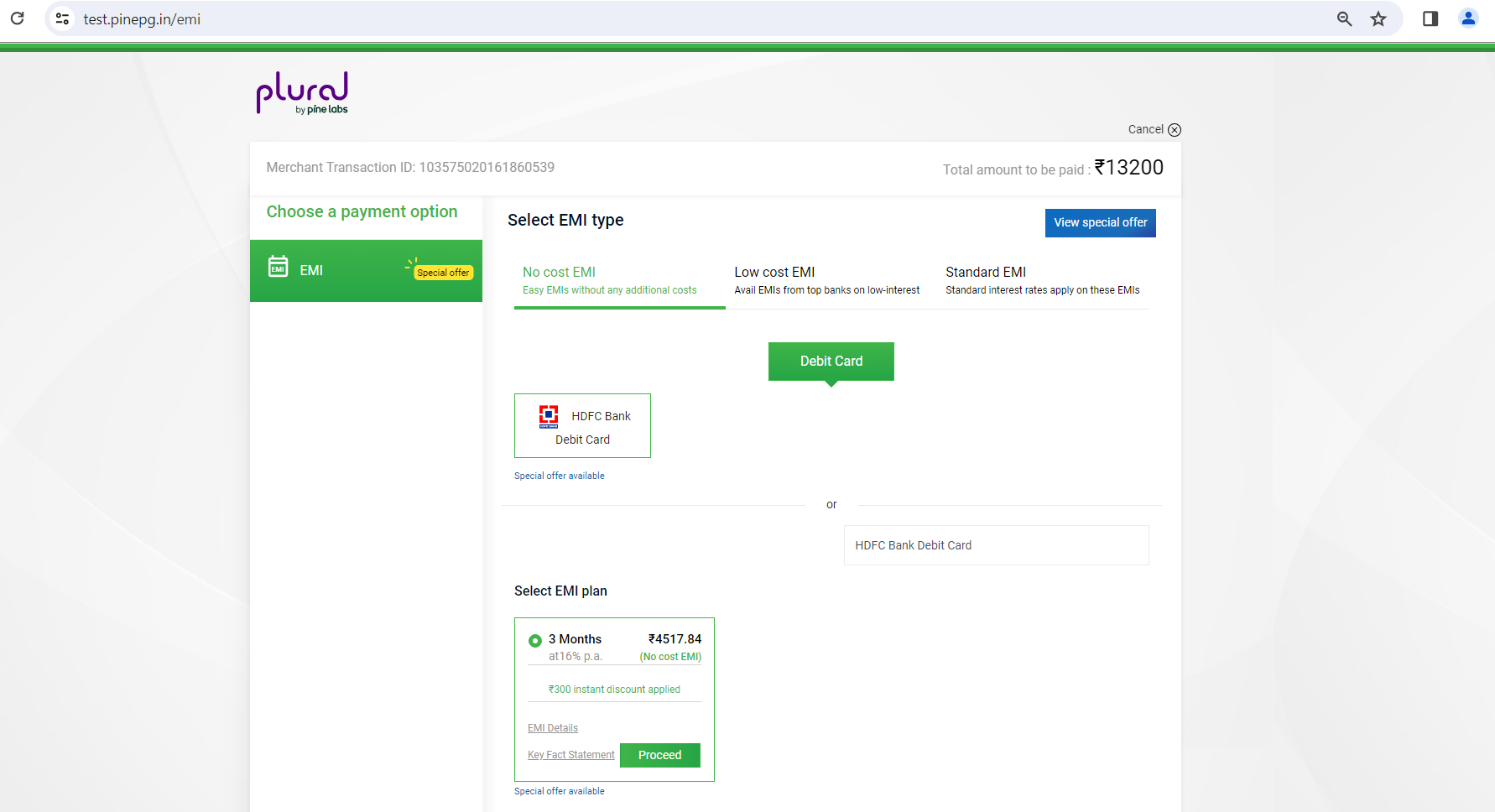
1). EMI Calculator API returns the offers which is being shown issuer wise in checkout screen.
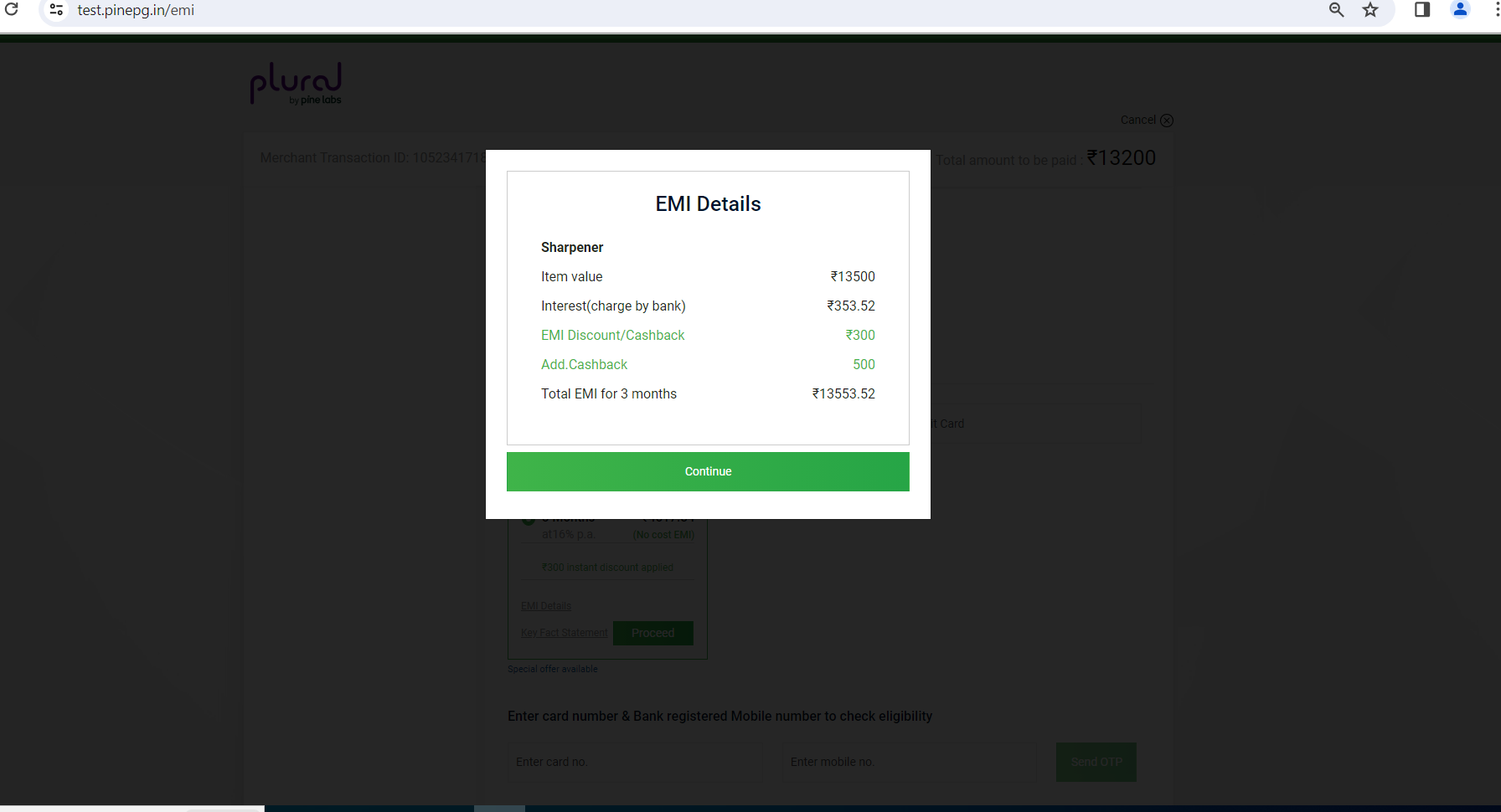
2). For each tenure, EMI Details link is shown which will open popup containing all EMI details when clicked.
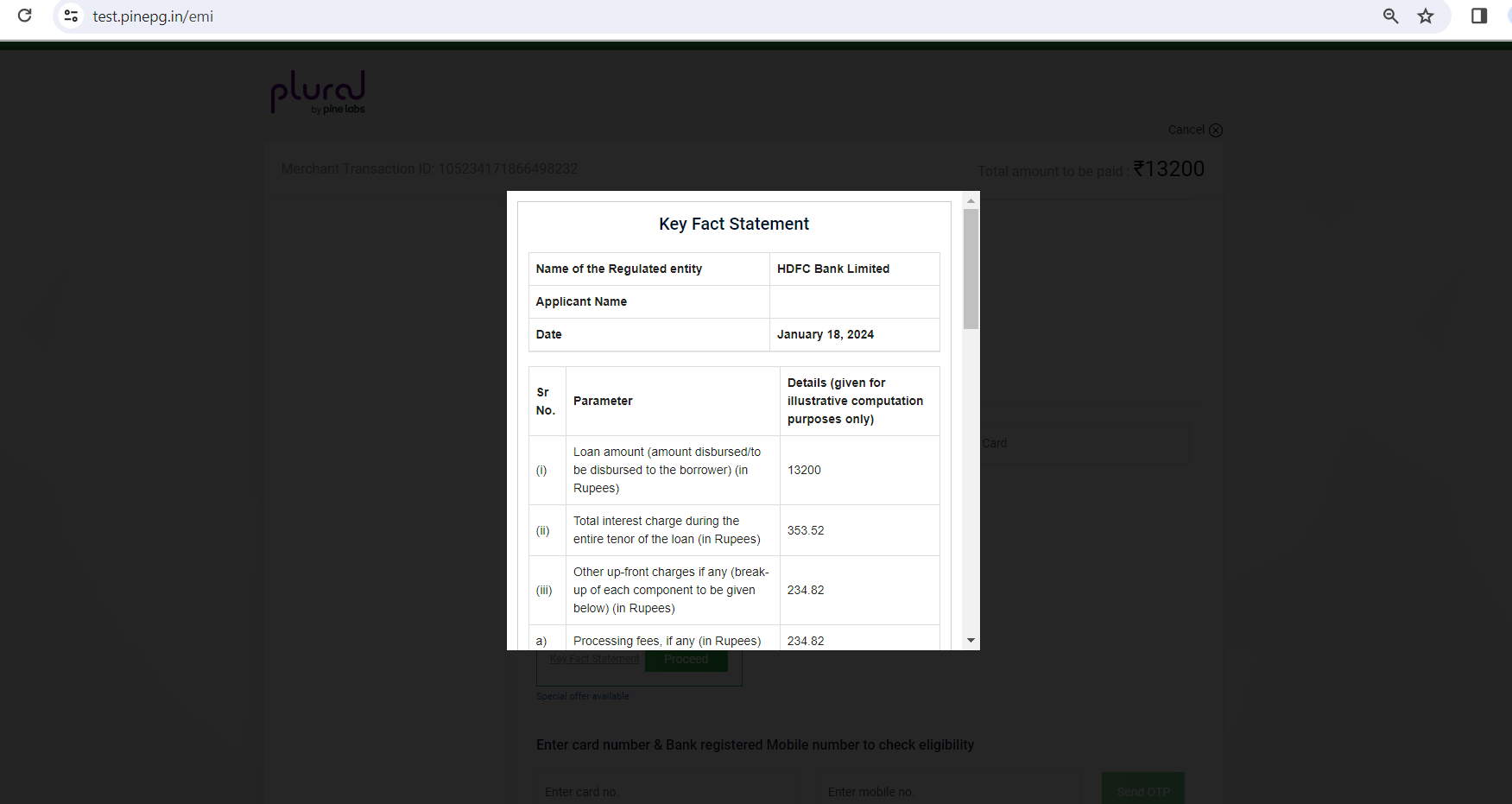
3). For each tenure, Key Fact Statement (KFS) link is shown which will open popup containing all KFS details when clicked.
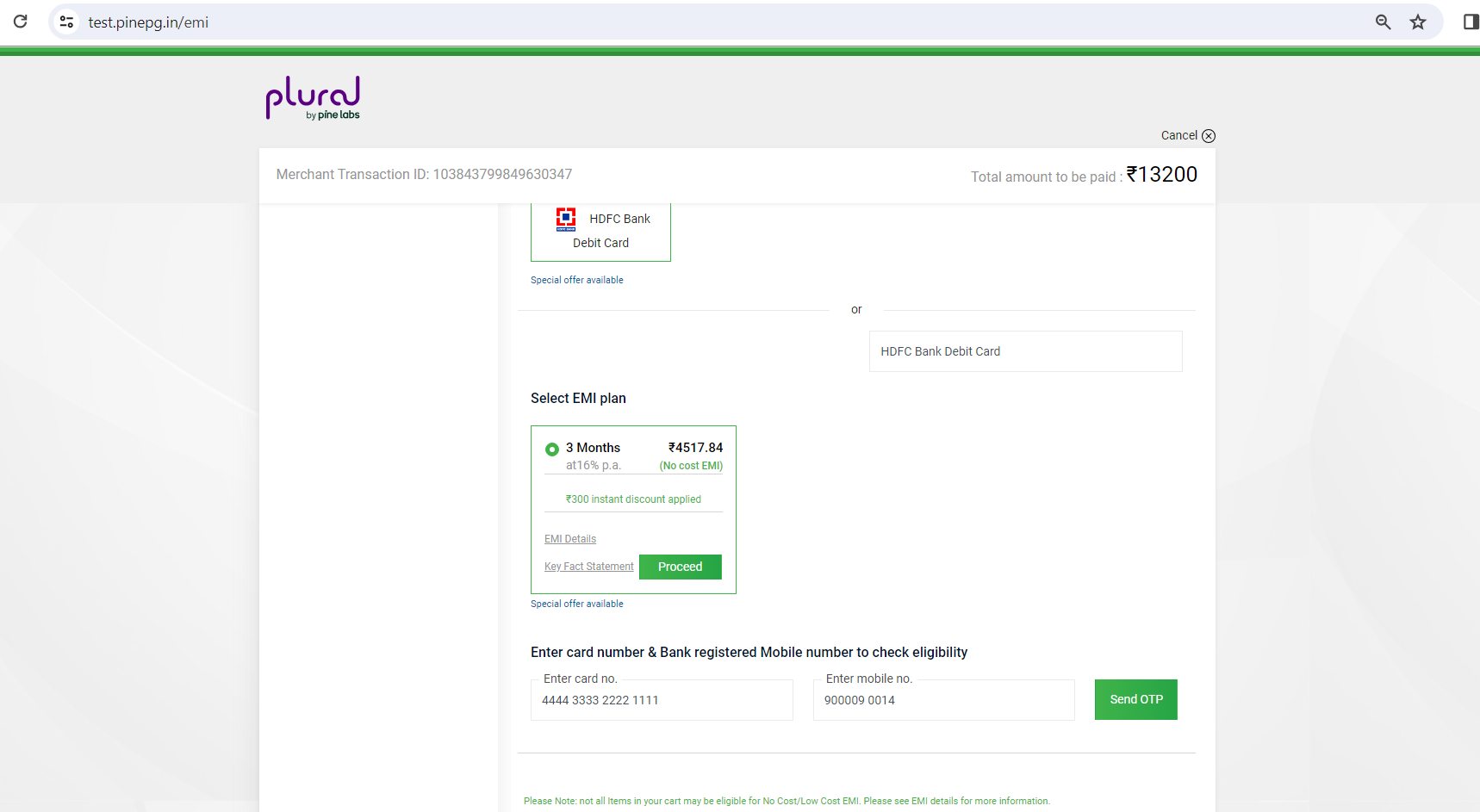
4). After selecting tenure, when clicked on Proceed, it will ask to enter Card Number and Mobile number.
5). After entering card/mobile no. details, when clicked on Send OTP, a popup will open where 6 digit OTP needs to be entered.
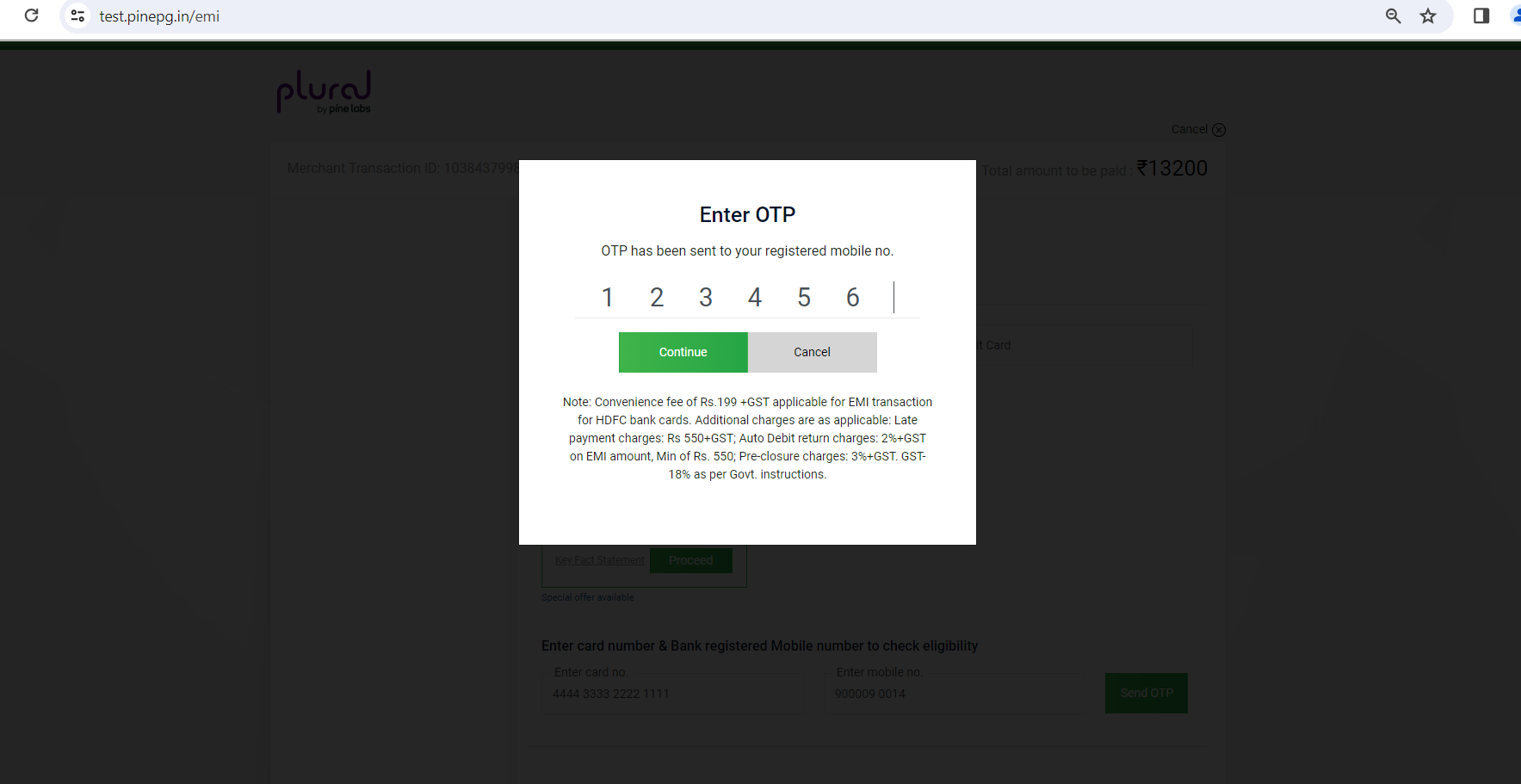
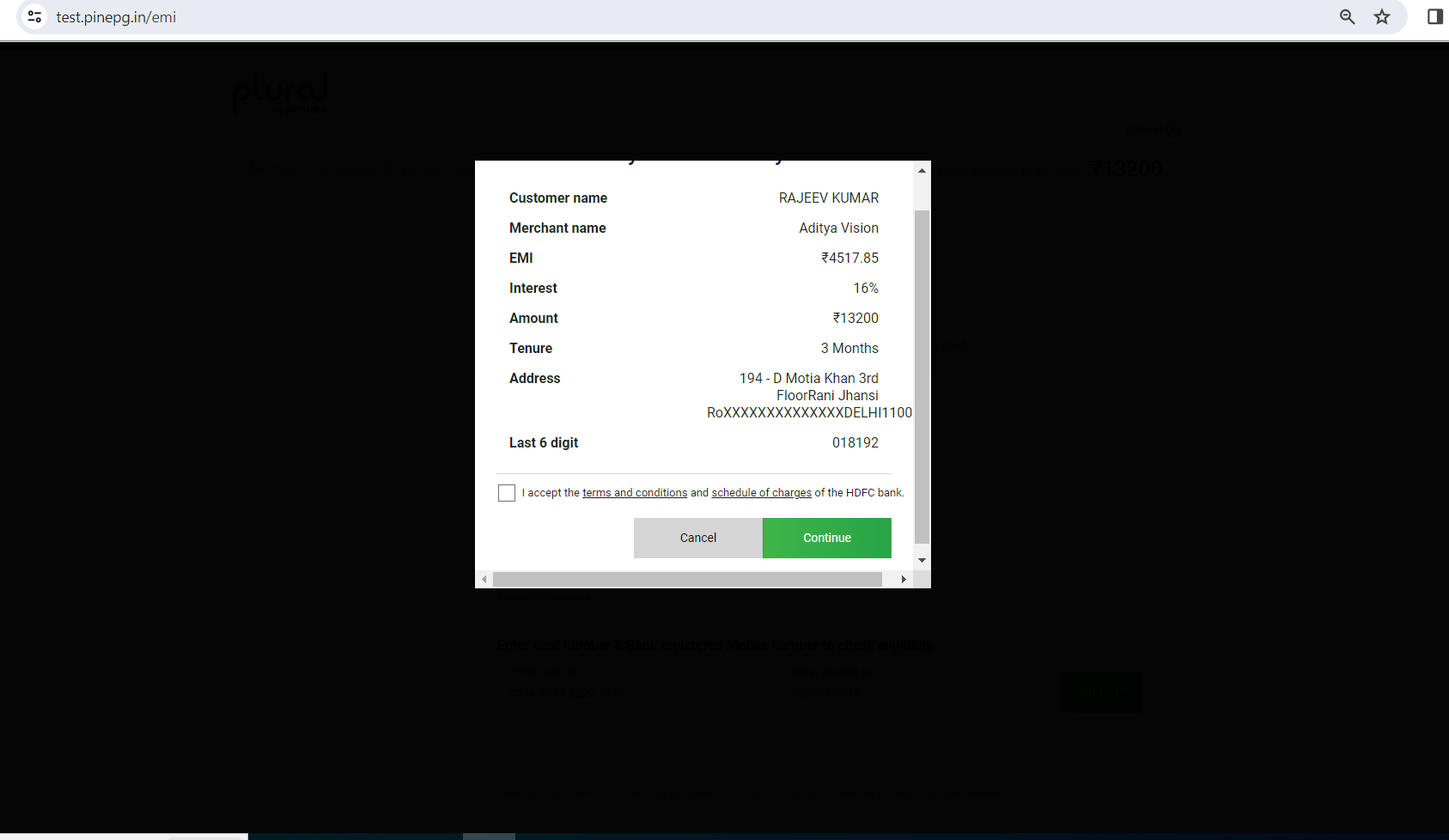
6). After entering OTP when clicked on Continue, it will open a popup where all Customer details are shown followed by checkbox to accept Terms and Conditions to complete the transaction.
Browser Redirect Response
| Key | Value | Description |
|---|---|---|
| merchant_id | Integer | In response you can see the merchant id which you have sent as one of the parameter in Pine Labs payment gateway API request parameters. |
| merchant_access_code | String | In response you can find the merchant access code which you have sent as one of the parameter. |
| unique_merchant_txn_id | String | In response you can find the merchant unique transaction Id which you have sent as one of the parameter. |
| pine_pg_txn_status | Integer | Transaction status |
| txn_completion_date_time | DateTime | The date-time of the transaction completion at Pine Labs payment gateway server. |
| amount_in_paisa | Long | It is the amount for which payment transaction is being done. |
| txn_response_code | Integer | Represent the response of the API request and response code is returned based on the transaction result. |
| txn_response_msg | String | Transaction response message |
| acquirer_name | String | Acquirer Bank |
| pine_pg_transaction_id | Long | Unique transaction id generated by Pine Labs |
| payment_mode | Integer | Payment mode chosen at landing page |
| dia_secret | String | Hash of response parameters. Please refer to HashGeneration document. Pine Labs payment gateway create the hash of the response parameters and sends this information in response in tag dia_secret Merchant should use this hash value returned in response to match with new secret generated at its side using other response Parameters. If these two secrets do not match then data is not authentic. |
| dia_secret_type | String | ‘SHA256’ or ‘MD5’ and will be the same which is passed in dia_secret_type parameter of request |
| is_bank_emi_txn | Bool | Flag to indicate Bank EMI transaction |
| is_brand_emi_txn | Bool | Flag to indicate Brand EMI transaction |
| emi_tenure_month | Integer | Tenure month of EMI transaction |
| emi_principal_amount_in_paisa | Long | Principal EMI amount in Paise. |
| emi_amount_payable_each_month_in_paisa | Long | Monthly Installment |
| emi_interest_rate_percent | Integer | Interest rate charged by bank multiplied by 10000 |
| emi_cashback_type | Integer | Its value will be 0, 1,2 and 3. Standard EMI- 0, Pre cash back-1,Post cash back-2,Instant Discount-3 |
| emi_total_discount_cashabck_amount_in_paisa | Long | Total discount or cashback amount applicable in EMI transaction in paise |
| emi_total_discount_cashback_percent | Integer | Total discount or cashback percent applicable in EMI transaction multiplied by 10000 |
| emi_merchant_discount_cashback_perecent | Integer | Merchant discount or cashback percent applicable in EMI tranasction multiplied by 10000 |
| emi_merchant_discount_cashback_fixed_amount_in_paisa | Long | Merchant fixed discount or cashback amount applicable in EMI transaction in paise |
| emi_issuer_discount_cashback_perecent | Integer | Issuer discount or cashback percentapplicable in EMI transaction multiplied by 10000 |
| emi_issuer_discount_cashback_fixed_amount_in_paisa | Long | Issuer fixed discount or cashback amount applicable in EMI transaction in paise |
| txn_additional_info | String | Base64 encoded string |
| merchant_return_url | String | Merchant Return URL |
| emi_processing_fee | Long | Processing fee amount in paise. |
| captured_amount_in_paisa | Long | Captured amount for a transaction |
| refund_amount_in_paisa | Long | Refund amount for a transaction. |
| parent_txn_status | Integer | Parent Transaction Status |
| parent_txn_response_code | Integer | Parent transaction response code |
| parent_txn_response_message | String | Parent transaction response message. |
| issuer_name | String | Issuing bank name |
| product_category | String | Product category for which EMI transaction has been placed.This parameter comes only in case of Brand EMI transaction |
| ppc_Manufacturer | String | OEM Name for which brand EMI transaction got placed.This parameter comes only in case of Brand EMI txn. |
Sample Response
pine_pg_txn_status = 4 , merchant_id = 119815 , unique_merchant_txn_id = 106507603309182912 , merchant_access_code = 0b8453fc-d7a2-4770-91cf-e2e01e6f65dd , amount_in_paisa = 1350000 , txn_completion_date_time = 22/01/2024 12:01:09 PM , txn_response_code = 1 , txn_response_msg = SUCCESS , acquirer_name = HDFCDebitEMI , pine_pg_transaction_id = 7848943 , emi_tenure_month = 3 , emi_interest_rate_percent = 16.00 , emi_principal_amount_in_paisa = 1274000 , emi_amount_payable_each_month_in_paisa = 436040 , is_bank_emi_txn = 1 , captured_amount_in_paisa = 1274000 , refund_amount_in_paisa = 0 , emi_cashback_type = 0 , payment_mode = 14 , udf_field_1 = , udf_field_2 = , udf_field_3 = , udf_field_4 = , txn_additional_info = eyJwcm9kdWN0X2RldGFpbHMiOlt7InNjaGVtZXMiOlt7InNjaGVtZV9pZCI6NTAxMjYsInByb2dyYW1fdHlwZSI6MTEyLCJpc19zY2hlbWVfdmFsaWQiOnRydWV9XSwicHJvZHVjdF9jb2RlIjoiNTgzMjciLCJwcm9kdWN0X2Ftb3VudCI6MTM1MDAwMCwic3VidmVudGlvbl9jYXNoYmFja19kaXNjb3VudCI6MjYwMDAsInByb2R1Y3RfZGlzY291bnQiOjUwMDAwLCJzdWJ2ZW50aW9uX2Nhc2hiYWNrX2Rpc2NvdW50X3BlcmNlbnRhZ2UiOjIwMDAwLCJwcm9kdWN0X2Rpc2NvdW50X3BlcmNlbnRhZ2UiOjAsInN1YnZlbnRpb25fdHlwZSI6Miwic3BlY2lhbF9vZmZlcl9jYXNoYmFjayI6IkdldCBEaXNjb3VudCBvZiBScyA1MDAuMDAgb24gU2hhcnBlbmVyICIsImJhbmtfaW50ZXJlc3RfcmF0ZV9wZXJjZW50YWdlIjoxNjAwMDAsImJhbmtfaW50ZXJlc3RfcmF0ZSI6MzQxMjAsInByb2R1Y3RfZGlzcGxheV9uYW1lIjoiU2hhcnBlbmVyIn1dLCJlbWlfc2NoZW1lIjp7InNjaGVtZV9pZCI6NTAxMzUsInByb2dyYW1fdHlwZSI6MTA1LCJpc19zY2hlbWVfdmFsaWQiOnRydWV9fQ== , parent_txn_status = , parent_txn_response_code = , parent_txn_response_message = , dia_secret = 9DFB5E4E480A44C836E0191497A728519F1B8019B8629B6103C4CDE69E1350D0 , dia_secret_type = SHA256